 23 Mar 2026
Web Hosting Explained: Complete Guide to Types, Features & How to Choose the Best Hosting for Your Website
If you think choosing a web host is just about finding the cheapest $2/month plan, you aren't building a business — you’re building a digital house of cards. In 2026, web hosting isn't a utility bill; it's your core SEO and conversion engine. If your host is slow, Google will ignore you, and your traffic will bounce before your first image even loads. Here is how to build on solid ground.
Web hosting is the invisible engine powering every single website on the internet. Whether you are launching a personal blog, starting an e-commerce store, or scaling a fast-growing SaaS platform, your choice of a hosting provider directly dictates your brand's digital success.
Think of web hosting as renting physical land on the internet. If you build a luxury retail store on a swamp, it will sink. In the digital world, cheap, unreliable hosting is that swamp. It leads to slow page speeds, frequent crashes, and frustrated users who will bounce before your site even loads.
In this comprehensive, no-nonsense guide, we will break down what web hosting is, explore the main types of hosting services, and give you a step-by-step framework to choose the best web hosting provider for your specific business goals.
⚡ Key Takeaways
Speed & SEO are Twin Flames: Your hosting speed directly impacts your Core Web Vitals. Slow server response times (TTFB) will actively tank your Google rankings, no matter how good your content is.
Never Choose Solely on Price: Cheap $2/month shared hosting is fine for a personal hobby blog, but it will bottleneck a growing business. If you have active traffic or run paid ads, start with at least a VPS or Managed WordPress/Cloud setup.
The "99.9%" Trap: 99% uptime sounds great on paper, but it actually means up to 3.6 days of website downtime per year. Always demand a host that guarantees 99.99% uptime.
Watch Out for Renewal Spikes: Hosting providers love to lure you in with $3/month promo rates, only to renew your contract at $15/month. Always check the renewal pricing before putting down your card.
What Is Web Hosting and How Does It Actually Work?
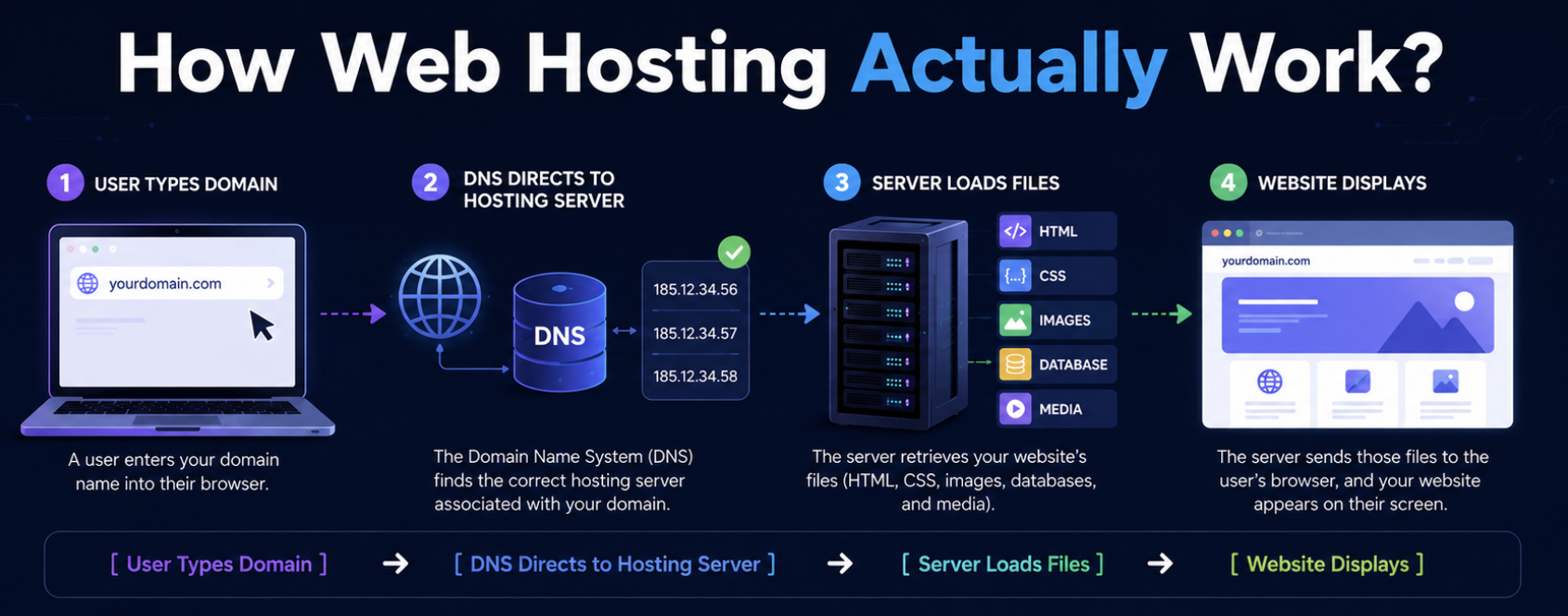
At its core, web hosting is a service where a provider allocates space on a physical server to store your website’s files (HTML, CSS, images, databases, and media).
When a user types your domain name into their browser, their computer connects to the server hosting your files. The server then "serves" those files to the user's screen.
[User Types Domain] ➔ [DNS Directs to Hosting Server] ➔ [Server Loads Files] ➔ [Website Displays]
Without a reliable hosting server, your domain is just an address pointing to an empty plot of land. To make your site accessible worldwide 24/7, hosting providers maintain massive data centers, optimize server uptime, handle physical security, and manage the complex network infrastructure that keeps the internet running.
Why Web Hosting Is Critical for SEO, Conversion Rates, and Performance
Many marketers and business owners treat hosting as a utility bill—something to pay and forget. This is a massive mistake. Your hosting provider has a massive, direct impact on your bottom line.
1. Page Load Speed and User Experience (UX)
Modern web users have zero patience. If your page takes longer than 3 seconds to load, over 40% of your visitors will bounce. Premium hosting providers use modern SSD storage, advanced caching, and high-performance CPUs to serve your website pages in milliseconds.
2. Google Rankings (SEO) and Core Web Vitals
Google uses page speed and user experience as ranking factors. Specifically, Core Web Vitals (which measure visual stability and loading performance) are heavily tied to server response time (TTFB - Time to First Byte). If your host is slow, your Google rankings will suffer.
3. Website Uptime and Revenue Protection
"Uptime" refers to the percentage of time your website is active and accessible. A host with 99.0% uptime sounds good, but that actually translates to over 3 days of downtime per year. If you run paid Google Search Ads or Facebook campaigns, downtime means you are literally throwing ad budget directly into the trash.
Types of Web Hosting Explained: Finding the Perfect Match
There is no "one-size-fits-all" solution in hosting. The best hosting service for a hobby blogger will crush a growing e-commerce store. Let’s break down the five most common types of web hosting, their pros, cons, and real-world use cases.
1. Shared Hosting — Best Cheap Hosting for Beginners
Imagine shared hosting like renting a room in a crowded co-living apartment. You share the kitchen, the bathroom, and the utilities with other roommates.
In shared hosting, hundreds of websites are hosted on a single physical server, sharing its CPU, RAM, and disk space.
Best for: New personal blogs, portfolio websites, and small local business sites with low traffic.
Pros: Extremely low cost ($2–$5/month), beginner-friendly, and requires zero technical skills.
Cons: If another website on your server gets a massive spike in traffic, your website will slow down to a crawl (the "bad neighbor" effect). You also have limited customization options.
2. WordPress Hosting — Optimized Speed for WP Users
WordPress hosting is a specialized environment specifically tuned to run WordPress websites. It often comes as managed WordPress hosting, meaning the provider handles updates, daily backups, and security patches for you.
Best for: Bloggers, content marketers, and businesses built entirely on the WordPress CMS.
Pros: Blazing-fast speeds due to server-level caching tailored for WP, automated plugin updates, and expert WordPress support.
Cons: You can only host WordPress sites (no custom PHP or node.js apps), and it is typically more expensive than standard shared hosting.
3. VPS (Virtual Private Server) Hosting — The Sweet Spot for Growing Sites
A VPS is like owning a condo. You still share the physical building (the server), but you have your own dedicated front door, walls, and guaranteed utilities that no one else can touch.
Through virtualization technology, a single server is partitioned into isolated virtual environments. You get dedicated resources (RAM and CPU) that belong only to you.
Best for: Growing startups, medium-sized e-commerce stores, and high-traffic blogs.
Pros: Predictable, high performance, root access to server configurations, and excellent scalability.
Cons: More expensive than shared hosting, and requires at least basic technical knowledge to manage (unless you opt for a managed VPS).
4. Cloud Hosting — Scalable and Reliable Hosting for SaaS
Instead of your website living on one physical machine, cloud hosting spreads your data across an interconnected network of virtual servers. If one physical server goes down, another instantly takes its place.
Best for: SaaS platforms, rapidly scaling businesses, and websites with highly volatile traffic spikes.
Pros: Near-zero downtime, incredible scalability (you can increase CPU and RAM with a single click), and a "pay-for-what-you-use" pricing model.
Cons: Pricing can be unpredictable depending on traffic, and setting up custom cloud environments can be complex.
5. Dedicated Server Hosting: Private and Dedicated Cloud Servers
This is the digital equivalent of buying a private mansion. With dedicated server hosting (often called dedi servers in tech circles), you rent an entire physical server dedicated for hosting your project. No shared resources, no bad neighbors—just raw, unadulterated power.
The Hybrid Era (Dedicated Cloud Servers): If you want the physical isolation of a hosted dedicated server but need the instant scalability of the cloud, you should look into a dedicated cloud server hosting setup. Using cloud dedicated servers allows you to spin up resources on demand while maintaining a highly secure, private environment.
Who is hosting a dedicated server for? It is the ultimate dedicated hosting solution for enterprise-level applications, heavy databases, and large-scale platforms.
Pros: Absolute control, maximum performance, and custom configuration of your dedicated hosting servers.
Cons: It is the most expensive server hosting dedicated option on the market. Managing a dedicated host server requires high-level technical expertise.
How to Choose the Best Web Hosting Provider: A Step-by-Step Checklist
Choosing a web host is a long-term commitment. Migrating a website later because of poor service is a headache you want to avoid. Use this step-by-step framework to evaluate providers before you buy.
Step 1: Define Your Website Needs
Don't overbuy. If you are starting a simple blog, don’t pay for cloud hosting.
Traffic: How many monthly visitors do you expect in the next 6 months?
Platform: Are you using WordPress, Webflow, or a custom-coded stack?
E-commerce: Do you need to process payments securely on your server?
Step 2: Look Under the Hood (Performance Metrics)
Never trust a hosting company’s marketing copy. Check their actual technical specs:
SSD or NVMe Storage: Traditional HDDs are obsolete. Ensure your host uses fast SSD storage.
Server Response Time (TTFB): Look for independent speed tests. A good host should have a TTFB under 300ms.
Global CDN Integration: A Content Delivery Network (like Cloudflare) caches your site globally, speeding up loading times for international visitors.
Step 3: Verify the Uptime Guarantee
Never sign up with a host that doesn't offer at least a 99.9% uptime guarantee. Some premium hosts offer 99.99% uptime, which is the industry gold standard.
Step 4: SSL Certificates: From Basic Encryption to Enterprise Solutions
An SSL certificate is what changes your URL from http:// to the secure https://.
Where to get them: While most modern dedicated server hosts offer free SSLs via Let's Encrypt, some legacy platforms require manual integration.
The Legacy Provider Trap: If you are managing certificates via older registrars, you might run into issues with the network solutions ssl certificate setup. Many users searching for ssl network solutions or looking at alternative platforms like ssls.com realize that paying $100+/year for a basic SSL is a relic of the past. Ensure your chosen host doesn't lock you into expensive proprietary SSL certificates when free, automated alternatives exist.
Step 5: Read the Fine Print on Pricing
The hosting industry is famous for low introductory prices that skyrocket upon renewal.
Example: A host might advertise $2.95/month, but when your 1-year contract ends, the renewal price jumps to $11.99/month. Always check the renewal rate before checking out.
How Web Hosting Fits Into Your SaaS Distribution Strategy
If you are currently building a software product, you are probably spending sleepless nights figuring out how to promote a SaaS platform and drafting your SaaS distribution strategy.
But here is a hard truth: you can have the most brilliant marketing campaign, but if your application crashes during a product launch on Product Hunt or after an influencer mention, your acquisition funnel is broken.
When you promote a SaaS platform, speed and reliability are your silent sales reps. Choosing a cloud dedicated server or a high-performance managed VPS ensures that when traffic spikes, your app remains lightning-fast. In SaaS, a 1-second delay in app load time can drop trial-to-paid conversions by 7%. Infrastructure is marketing.
Quick Comparison: Best Web Hosting Providers for Different Budgets
To save you hours of research, we have categorized the top market players based on specific use cases. For a deeper dive into features and speed tests, check out our complete guide to the best web hosting providers.
Host Provider | Best For | Key Advantage | Price Range |
Bluehost | Beginners & WordPress | Recommended by WordPress, highly intuitive dashboard | $ - Cheap |
Namecheap | Budget-Conscious Users | Low entry cost, free domain included | $ - Cheap |
Hostinger | Value & Performance | Incredible speed for the price, global servers | $$ - Moderate |
SiteGround | Small Businesses | Legendary 24/7 support, top-tier security | $$ - Moderate |
Kinsta / WPEngine | Premium Enterprise WP | Managed cloud hosting, lightning-fast | $$$ - Premium |
5 Essential Web Hosting Features You Actually Need
When comparing hosting packages, ignore the marketing fluff and make sure you get these five core features:
Domain Registration: Many hosts offer a free domain name for the first year, making it easy to manage your domain and hosting under one dashboard.
Free SSL Certificates: Installs the green padlock icon in browsers. Without it, Google Chrome will flag your site as "Not Secure."
Professional Email Hosting: Allows you to create trust-building emails like
hello@yourdomain.cominstead of using a generic Gmail account.One-Click Installs: Easily install WordPress, Joomla, or Drupal with a single click, completely skipping manual database setup.
24/7 Customer Support: Websites don't just break during business hours. Look for live chat support that is available 24/7/365.
3 Critical Web Hosting Mistakes to Avoid
Choosing Hosting Solely on Price: Going with the absolute cheapest $1/month host usually results in slow load times, frequent site crashes, and nonexistent support. Your time and business reputation are worth more than saving $3 a month.
Ignoring the Backup Policy: Many beginners assume their site is automatically backed up. If your site gets hacked or a plugin update breaks your design, without a recent backup, you might have to rebuild your site from scratch.
Not Planning for Scale: If you plan on launching marketing campaigns that will drive sudden traffic spikes, make sure your host allows you to easily upgrade from a shared plan to a VPS or Cloud plan without downtime.
Final Thoughts: Which Hosting Should You Choose Today?
Your web hosting is the foundation of your entire digital presence.
If you are a beginner, blogger, or local small business looking for a simple setup, start with Bluehost or Namecheap.
If you are building a fast-growing startup, an e-commerce brand, or a SaaS product, skip the shared hosting entirely and invest in a high-quality VPS or Cloud Hosting solution to ensure your site is fast, secure, and ready to scale.
Frequently Asked Questions
Chapters in this Guide


 Apr 4, 2026
Dedicated Server Hosting 2026: Architecting Raw Power and Absolute Control
The Blueprint for Absolute Infrastructure Control. Forget the "virtualization tax." Dedicated servers remain the gold standard for security-sensitive projects and high-load applications. We skip the fluff and get straight to the "meat": how to choose the right provider, eliminate bottlenecks with NVMe/DDR5, and ensure your Digital Trust remains unshakeable in a competitive market.
 Apr 3, 2026
Best Web Hosting Providers (2026): Top Hosting Services for Every Need
Choosing the best web hosting provider is one of the most important decisions for any website. The right hosting affects performance, SEO rankings, security and user experience. In this guide, we review the best web hosting providers for different use cases — from beginners to businesses and developers — and help you choose the right solution.
 Apr 14, 2026
What Is Cloud Hosting? Complete Guide (2026)
A complete guide to cloud hosting — how it works, its benefits, and when to use it. Learn how cloud hosting compares to VPS, shared, and dedicated solutions.





Be the first to comment!